Best ripping apps. Pokémon, sports & your collection.
Compare iPhone and Android options for collectible pack opening, plus companion tools for managing the cards you keep. Find official downloads and the practical differences before your next reveal.
We may earn a commission through links on this page. Details
Ripping apps at a glance
Start with your device and the kind of collection you want. Compare pack formats, available downloads and the terms that apply to your account.
Six mobile and browser options for card collectors
TheCollectibles appears first as our featured collection companion. Packs.com is a browser-based option, followed by four platforms with verified native pack-app listings. Scores below assess the overall platform; see each review for the scoring breakdown.
TheCollectibles.io combines its web pack platform with mobile scanning and portfolio management. It is a useful starting point for collectors who want to organize cards alongside their pack activity. The mobile apps serve as collection companions; use the web platform for the pack offering covered in our review.
Pros
Card scanning and portfolio management on mobile
Web pack platform alongside collection tools
Cons & considerations
Physical delivery costs are separate from pack purchases
Pack outcomes vary; compare the current pool and buyback offer
Packs.com offers online card packs, Single Pulls and a marketplace. Revealed cards go into your Backpack, where you can keep them, sell them back for site Coins or request physical delivery. Use the website for this option; the links below take you to Packs.com and our full platform review.
Pros
Card packs, Single Pulls and a marketplace
Physical cards can be kept, sold back for Coins or shipped
Cons & considerations
Sell-back Coins cannot be withdrawn as cash
Physical delivery and destination costs are separate from a pull
Browser-based platform
WELCOME OFFERFree welcome packChoose an eligible welcome pack after signing up.Offer details ↗
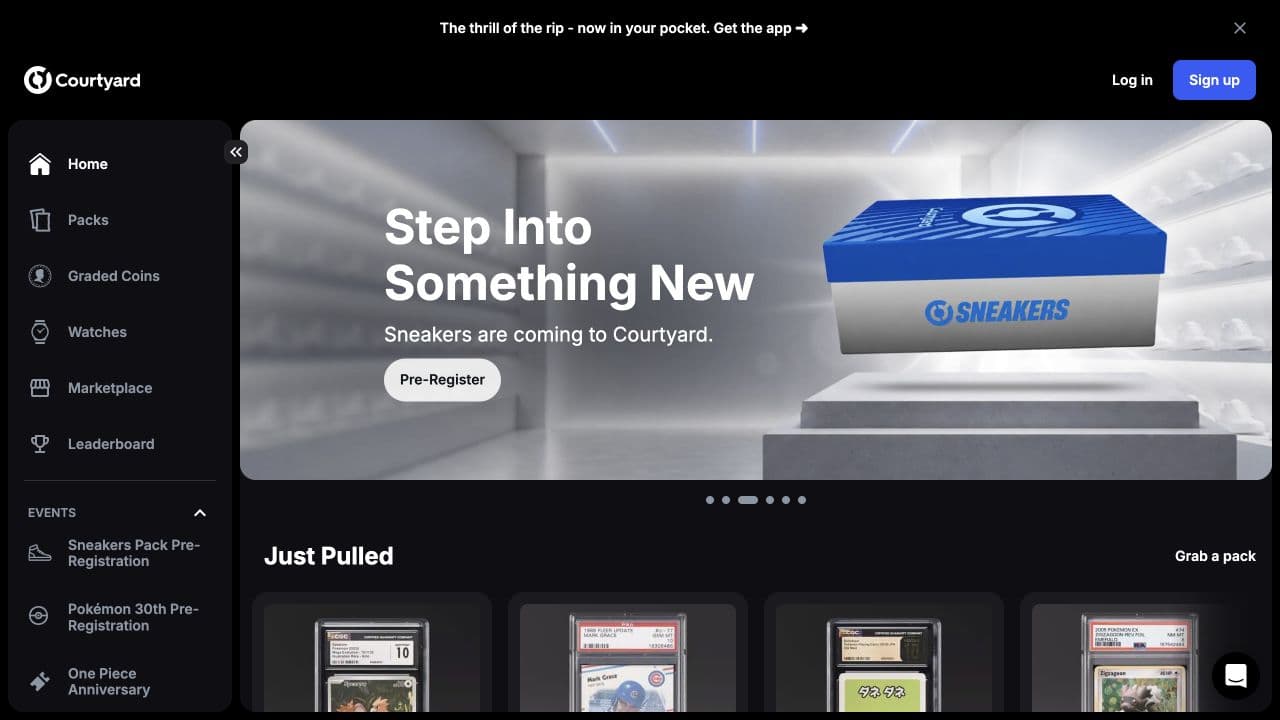
Courtyard’s app connects digital pack reveals with physical collectibles and a marketplace. Its official listings cover Pokémon and sports cards as well as other categories, with options to retain, sell or redeem an item. Select the category carefully: a watch or coin pack is a different purchase from a card pack.
Pros
Verified App Store and Google Play listings
Packs, marketplace and collection management together
Cons & considerations
Pack categories have different contents and terms
App availability does not confirm country eligibility
Arena Club brings Slab Packs, a card marketplace and collection display into its mobile offering. The developer describes graded sports and TCG cards, with shipping and buyback options after a reveal. Its showroom is relevant if you want to keep and organize cards instead of immediately selling every pull.
Pros
Verified downloads for both main phone platforms
Slab Packs and marketplace in the same app
Cons & considerations
Check the exact grader and eligible pack pool
A listed market value is separate from a buyback offer
Trove’s iPhone listing describes pack opening across Pokémon, One Piece and sports, together with PSA vault storage, delivery and sell-back. That makes its custody route worth comparing if the final destination of a graded card matters to you. Confirm the current pack, account requirements and shipping costs before choosing a tier.
Pros
Official iPhone pack-opening app
PSA vault and physical-delivery workflow described
Packz’s official iPhone app describes a straightforward sequence: choose a pack, reveal a physical card, then decide whether to ship it or sell it back. Its listing explains that card values use real-world market information. Compare the actual available pack and withdrawal terms rather than treating a headline chase value as a likely outcome.
Pros
Official iPhone download with physical-card redemption
Shipping and sell-back routes described
Cons & considerations
No verified matching official Android listing
Pack price and resale proceeds can differ substantially
Store links checked September 17, 2026. Download buttons link to the official store listings reviewed for this comparison.
Best ripping apps for iPhone
Courtyard, Arena Club, Trove and Packz all have official iPhone listings describing physical-card pack features. Start with the category you collect, then compare how the app handles the revealed card. A useful collection screen, a marketplace and a shipping request are different features; decide which ones you will actually use.
Check the compatibility section before installing, especially on an older phone. Also inspect the seller name and linked operator website. A similar name or icon does not establish that an app belongs to the platform you intended to use.
Best ripping apps for Android
TheCollectibles has an Android collection companion for scanning and portfolio management, linked above on Google Play. Courtyard and Arena Club also have native Android apps for their pack platforms. Their Google Play links above identify the matching operator. For platforms without a confirmed Android listing, start from the official website instead of choosing a similarly named search result. A mobile website may work in your browser, but it is not evidence of a native Android app.
Pokémon, sports cards and other TCGs
For Pokémon mystery-pack apps, look beyond the familiar character on the cover. Check whether the pool contains graded singles, raw cards or sealed products, and which languages and sets are included. For sports cards, distinguish an individual-card pack from a break slot allocated by team or player. Our mystery pack comparison explains the main formats.
A broad TCG label is not confirmation of a current Yu-Gi-Oh! or One Piece pack. Search the operator’s live catalog for your game and read the eligible pool. Categories can change faster than an app’s store description.
Courtyard’s public website, captured September 14, 2026. Website preview, rather than a native-app screenshot; the store buttons above show the app’s own listing.
How to choose a pack opening app
Choose the outcome. Decide whether you want to keep the card, request delivery or consider a sell-back offer.
Read the pack details. Check the eligible pool, probabilities, grader and valuation basis for that purchase.
Calculate the full cost. Include payment costs, shipping and withdrawal charges where applicable. Use our buyback calculator to compare an offer with your spend.
Check account eligibility. Confirm residency, age, identity and payment requirements before buying. US and European collectors need their own destination checks.
Use an official download. Follow the operator’s store link and confirm the developer. App-store access alone does not verify an account’s eligibility.
What happens after you open a pack?
The reveal is only the first step. A physical-backed card typically enters your platform inventory, where the available choices may include holding it in a vault, requesting delivery, listing it for sale or accepting a buyback. Check the deadline before leaving a card untouched: the available offer can expire even while the card remains in your collection.
For delivery, compare handling time, shipping charges, insurance and destination access. The card’s displayed value is not your delivery cost or a guaranteed sale price. Our guide to shipping vaulted cards explains what to confirm.
Free downloads, welcome offers and paid packs
Installing an app can be free while every ordinary pack still costs money. A welcome offer might be a coupon, a pack awarded after a deposit, or bonus credit covering part of a first pull. Read the conditions in the linked review before signing up, especially if a referral link or code must be used during registration.
Confirm the developer and use the matching official store button.
Read the current pack checklist, grade range and probabilities on your phone.
Check the final price and currency before confirming a purchase.
Locate your collection, shipping controls and support channel before buying.
Save the purchase receipt and the terms shown for any welcome promotion.
How we compare the apps
The RipCompass team reviewed official App Store and Google Play descriptions and connected them to our existing platform research. Native app entries include a traceable download route; Packs.com is included separately as a browser-based platform. TheCollectibles’ entry covers its brand-confirmed collection companions and web platform. Featured placement is separate from editorial scoring. Read our comparison method, or see the broader best card ripping sites toplist.
Frequently asked questions
Can I sell a card back inside a ripping app?
Several listed platforms describe sell-back features, but the rate, deadline and balance type depend on the platform and pack. Check whether the offer becomes withdrawable money or credit. A 90% buyback is generally a percentage of card value, not a refund of 90% of your pack purchase.
What is the difference between a ripping app and a simulator?
A physical-card ripping app assigns a real collectible to your account and offers a stated custody or shipping route. A simulator or digital TCG can reveal cards that exist only inside that game. Check the product description before assuming a digital reveal can be shipped.
What is the best ripping app?
Start with your phone and collecting goal. TheCollectibles has featured placement here for its collection companion tools and web platform. Courtyard and Arena Club have verified iPhone and Android pack-app listings; Trove and Packz have verified iPhone listings. Compare the pack pool, total cost and redemption route before choosing.
Are “rippin apps” the same as card ripping apps?
In collector searches, “rippin apps” usually means apps for opening card packs. Check whether the app reveals physical-backed cards, sells a live-break place or only opens virtual cards inside a game. These formats have different outcomes.
Can I open Pokémon packs and receive real cards?
Some apps on this page describe physical-backed Pokémon card reveals with shipping options. They are not automatically official Pokémon booster packs. Check the product format, eligible cards and redemption terms for the specific pack.
Which ripping apps work on Android?
We verified Google Play listings from the matching developers for Courtyard and Arena Club. TheCollectibles also has Android collection companion functionality confirmed by the brand. We have not verified official Android downloads for Trove or Packz.
Does TheCollectibles have iOS and Android apps?
The brand confirms iOS and Android apps for card scanning and portfolio management. This comparison links to its web platform with store buttons shown in grey until download links are added. Use the web platform for pack opening and the mobile tools to manage your collection.
Are these pack opening apps free?
A free download does not mean physical-backed packs are free. Pack purchases, delivery and other account charges are separate. Promotional credit may also have conditions that differ from a cash balance.
Can I use ripping apps in the UK or Europe?
Check your exact country with the operator. Being able to view or install an app does not establish permission to buy packs, withdraw money or receive a shipment. Storefront, account and delivery availability are separate checks.
Do RipCompass scores measure app-store ratings?
No. The scores shown here are labelled as publisher ratings or editorial scores, with their breakdown linked in each review. They are not Apple or Google user ratings, and do not measure device performance, crash rates or mobile usability.
 RipCompass